Zapier’s Admin Center is a central hub for all admin settings in Team and Enterprise accounts. It includes a dashboard with key metrics of your account’s health, outstanding issues that should be reviewed, and additional resources.
You can go to the Admin Center by clicking the Admin Center icon in the left sidebar on any main Zapier page.
 in the left sidebar on any main Zapier page.
Available on plans:

Free
Pro
Team
Enterprise
Prerequisites
Admin settings sidebar
In the Admin Center, there’s a second left-hand sidebar that you can use to navigate to your dashboard and all other admin settings pages. When you select a page in the admin settings sidebar, the Admin Center will display it to the right.
Admin Center dashboard
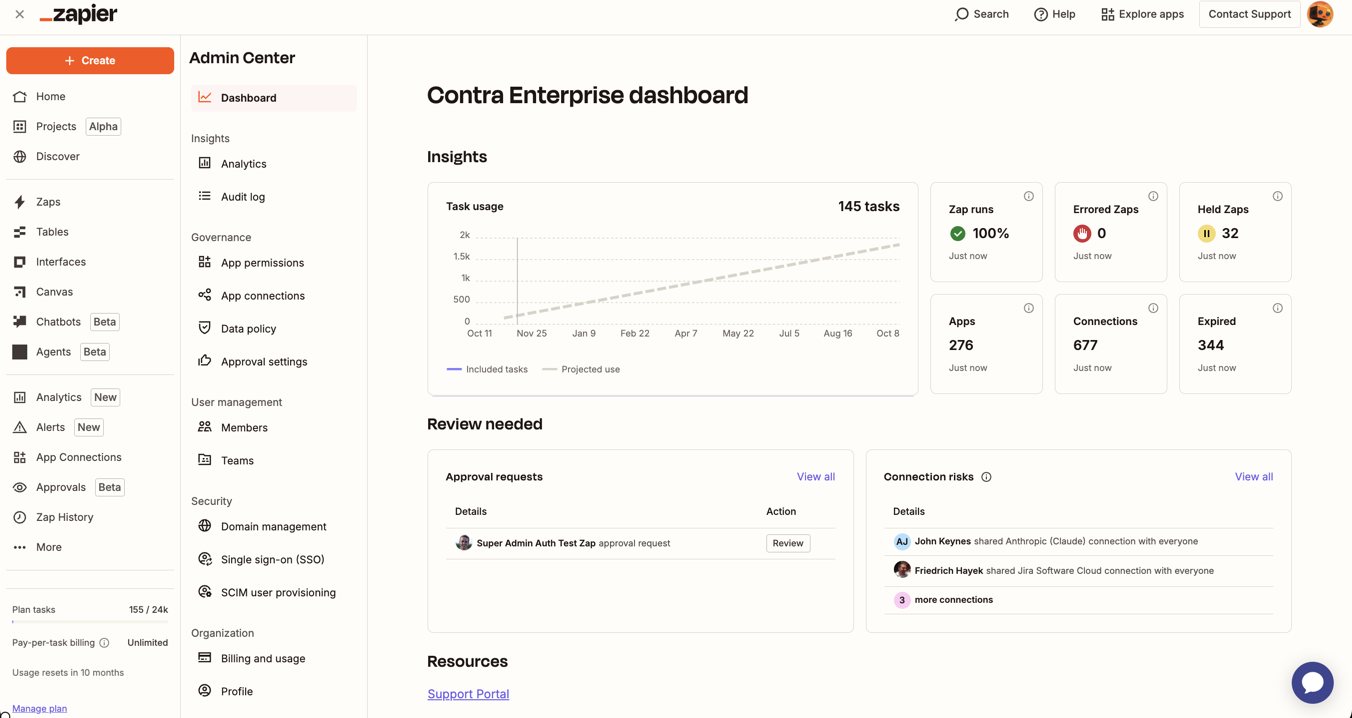
The dashboard page is the default view. It consists of 3 sections:
- Insights.
- Review needed.
- Resources.
Insights section
The Insights section contains widgets displaying quick stats of your account health:
- Task usage: how many successful Zap actions were used in the current usage period. Learn more about how task usage is measured.
- Zap runs: the rate of successful Zap runs in the current usage period.
- Errored Zaps: the number of errored Zap runs in the current usage period.
- Held Zaps: the number of Zap runs that were held in the current usage period.
- Apps: the number of apps in use.
- Connections: the number of app connections in use.
- Expired: the number of expired app connections that need to be reconnected.
Review needed section
The Review needed section contains two widgets for issues you should address.
- Approval requests: if you restrict publishing, this widget displays any pending requests. You can review and approve or reject.
- Connection risks: This widget displays connections that are “risky” because they’re shared with everyone. This means any user has full access to use the app connection in their own workflows.
Resources section
The Resources section contains a link to the Support Portal where you can get additional help with your account and workflows.
Other admin settings pages
Below the dashboard page, the admin settings sidebar contains additional admin settings pages, grouped by type.
Insights settings
Get visibility into your account usage.
Governance settings
Control how your account is used and how long your data is retained by Zapier.
User management settings
Manage members and teams within your Enterprise account.
Security settings
Control who can access your account.
Organization settings
Review your plan usage and change your profile settings.
Limitations
If you are on a Team plan, you will only see features that are available on your plan.