The Usage insights tab displays how you're using tasks throughout the current billing cycle. In this tutorial, you'll learn how to access the tab and understand the information it displays, so you can monitor your usage and keep your critical workflows running. You'll also learn how to export your usage history for past billing periods.
Available on plans:

Free
Professional
Team
Enterprise
Before you begin
On Team and Enterprise plans, the Usage insights tab is available to specific roles:
| Plan | Roles with access |
|---|---|
| Team | Admin, Owner |
| Enterprise | Admin, Super Admin, Owner |
Where can I find the Usage insights tab?
You can find the tab in the Billing and usage settings.
- Go to the Billing and usage settings.
- Click the Usage insights tab.
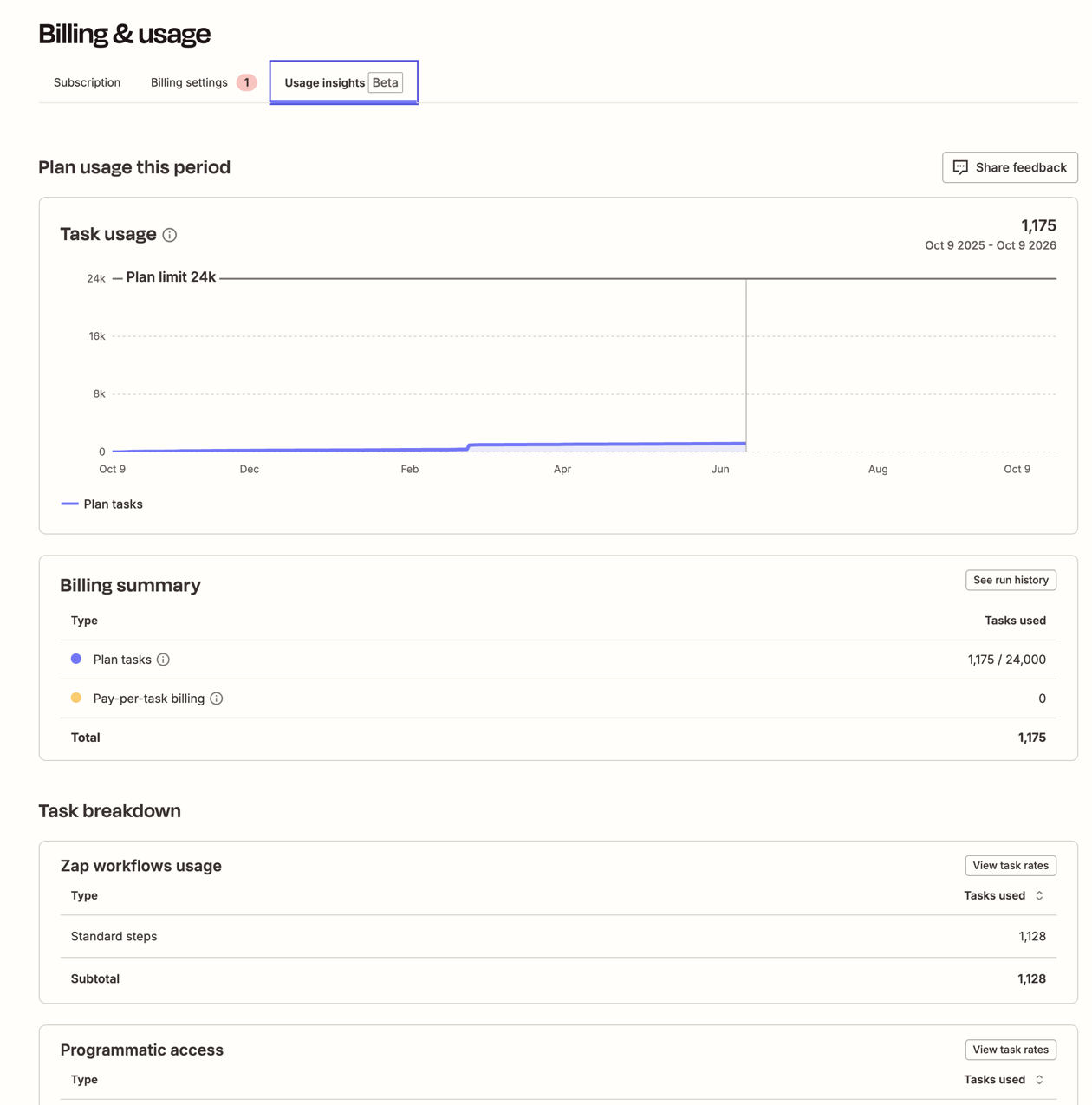
What information is available in the tab?
The Usage insights tab displays two sets of information:
- A graph showing task usage as a line, plotting the number of tasks used per day within the current billing period.
- A table displaying the usage by type, with one row for plan-included tasks and one for pay-per-task billing.
Task usage graph
On the graph, you can find the number of billable tasks used each day during the current billing period. You can find the total billable tasks at the top right. The maximum number of tasks displayed on the Y axis will depend on your plan and whether you have pay-per-task billing enabled for your account.
Table with usage by type
This table displays:
- The type of task used.
- The number of tasks used.
- The price per unit.
- The estimated cost.
This information is broken into different types of usage:
- Tasks included in the plan.
- Pay-per-task billing.
- Promotional tasks.
 Note
NotePay-per-task billing and promotional tasks will only appear if:
- You turn on pay-per-task billing.
- You've met the eligibility for promotional tasks.
Projections and alerts
When your account reaches 80% of your total tasks for that billing period, the usage graph will display a projection of future task usage. This is an estimate of how many more tasks you might use before the end of that period. You'll also receive alerts on the screen when it reaches 80% and 100% of your task limit. You can then upgrade your plan or, if you have not used it yet, turn on pay-per-task billing.
Export usage history
 Beta
BetaUsage history export is in open beta. It's available for use, but still in active development and may change.
You can download a CSV file of your account's task usage for your last 12 completed billing periods. Use it to compare usage across billing periods, or to check your usage against your invoices.
The export is available on Free, Professional, and Team plans with a monthly task limit. It is not available on Enterprise plans or on plans with an annual task limit.
To export your usage history:
- Go to the Billing and usage settings.
- Click the Usage insights tab.
- In the upper right of the Plan usage this period section, click Export usage history. A CSV file downloads to your computer.
What the file contains
The file name uses the format zapier-usage-{account_id}-{start_date}-{end_date}.csv. The end date is the last day included in the file.
Each row covers one billing period. The file contains these columns:
| Column | Description |
|---|---|
usage_billing_period_start |
The first day of the billing period. |
usage_billing_period_end |
The first day of the next billing period. Usage on this date is not included in the row. |
days_in_usage |
The number of days in the billing period. A period can be shorter than a month if your plan changed during it. |
plan |
Your plan during the billing period. |
plan_task_limit |
The number of tasks included in your plan each month. |
total_tasks_used |
The number of billable tasks used during the billing period. |
pay_per_task_used |
The number of tasks used above your plan's task limit. This is total_tasks_used minus plan_task_limit, and is never less than zero. |
The file shows task counts only. It does not include prices, pay-per-task rates, or costs.
The file shows totals for the whole account, so it is the same no matter which admin exports it. To get task usage for each member of a Team or Enterprise account, export member task usage data instead.
Limitations
Why the Usage insights tab may differ from your task history
The data on the Usage insights tab may differ from the task usage in your task history for these reasons:
- The graph covers only the current billing period and uses the UTC time zone. Your profile may use a different time zone, and your task history may cover a different date range.
- The Usage insights tab includes only billable tasks. Tasks that are not charged are not counted on the tab.
What the usage history export cannot do
- Each export covers your last 12 completed billing periods. You cannot choose a different date range.
- If your account is newer than 12 billing periods, the file only includes the billing periods since you created your account.
- The file does not include billing periods when your account was on a Free plan. If you are on a Free plan now, you can still export any past billing periods on a paid plan.
- The file does not include your current billing period. To monitor the current period, use the task usage graph on the Usage insights tab.
- The file does not break down usage by Zap.
- You cannot schedule automatic exports. You must export the file manually.
Why the usage history file may differ from your invoice
The usage history file shows the tasks your account used. Your invoice shows what Zapier billed you for. The two can differ slightly for these reasons:
- The file counts whole days. The file adds up usage by calendar day in UTC. Your invoice covers usage up to the exact time your billing period ended, which is usually partway through a day. As a result, the file can include or leave out a few hours of usage compared to your invoice.
-
Task credits are not subtracted. If your account received task credits, for example from Zapier Support, Zapier applies them when it creates your invoice. The file shows usage before credits, so
pay_per_task_usedcan be higher than the tasks on your invoice. - Invoice dates may not match billing period dates. Zapier bills pay-per-task usage after it happens, when your plan renews, changes, or is canceled. An invoice is usually dated at or just after the end of the period it covers.
- The difference is larger than about one day of your typical usage, and task credits do not explain it.
- A billing period on a paid plan is missing from the file.
- You were billed for pay-per-task usage in a period when you did not go over your task limit.
Include your account ID, the invoice number, the billing period dates, and the matching row from your usage history file in your request.
Next steps
You can now monitor your current task usage from the Usage insights tab and export your usage history for past billing periods.
- Learn which actions count as billable tasks.
- Keep your Zap workflows running after you reach your plan limit by turning on pay-per-task billing.
- Upgrade your plan if you consistently reach your task limit.