Use this article to troubleshoot common issues when using Code (JavaScript) by Zapier. Find your problem below and follow the steps to fix it.
Error messages
These are specific error messages you might encounter when running JavaScript or Python Code steps.
Symptom
Your Code step fails with the error "Scripting payload too large."
Causes
The environment in which Code steps run (AWS Lambda) has an I/O limit of 6 MB. The total size of the code and the data it processes cannot exceed that limit.
How to fix it
- Reduce the amount of data your function returns. Return only the keys you need instead of entire JSON structures.
- If you are processing a large API response, filter or trim the data before returning it.
Symptom
Your Code step fails with the error "Process exited before completing request."
Causes
- Your script completes without calling
callback. - Your
fetch().then()chain does not have a.catch()for errors, causing the process to exit silently.
How to fix it
- Add
.catch(callback)to yourfetch().then()chain so errors are passed as the first argument. - Alternatively, use
awaitwith a Code step to avoid callback issues entirely.
Symptom
Your Code step fails with the error "'NoneType' object does not support item assignment."
Causes
- You used indexed assignment on a value that is
None, for examplemy_dict[key] = valuewhenmy_dictisNone. - A variable you expected to be a dictionary or list was never initialized, or came back as
Nonefrominput_dataor an earlier step.
How to fix it
- Initialize containers before you assign into them, for example assign
{}or[]first if you are building a dict or list. - When reading
input_data, use.get()or checkis not Nonebefore you assign into nested structures. - Avoid reusing variable names in a way that overwrites Zapier-provided values with
None.
Symptom
Your Code step fails with the error "You cannot return more than 250 items from a Code action."
Causes
Code steps are limited to 250 items in the output object.
How to fix it
- Reduce the number of items in your return object to 250 or fewer.
- If you need to process more items, split the work across multiple Code steps or filter the data before returning it.
Symptom
Your Code step fails with a timeout or memory error.
Causes
Code steps have rate limits and throttling that vary by plan. Your Zap will error if it exceeds these limits.
How to fix it
- Review the Code by Zapier rate limits for your plan.
- Optimize your code to reduce execution time and memory usage.
- If you are using third-party packages, large packages can increase install time. Try using a smaller, more focused package.
Zapier SDK errors
These issues relate to using the Zapier SDK in Code steps.
Symptom
Your Code step fails with the error "Authentication failed" when using the Zapier SDK.
Causes
The app connection used by the SDK has expired or been revoked.
How to fix it
- Reconnect the app connection in the Zap editor.
- Confirm the connection is active in your app connections.
Symptom
Your Code step fails with the error "Connection not found" when using the Zapier SDK.
Causes
- The connection is not selected in the Code step's connection picker.
- The
appKeyin your code does not match the connected app (for example, using"Slack"instead of"slack").
How to fix it
- Open the Code step and check the connection picker to confirm the correct connection is selected.
- Verify the
appKeyin your code matches the app you connected. Use the Zapier SDK CLI to confirm the correct app key. If you have not logged in on this computer yet, runnpx @zapier/zapier-sdk-cli login, then runnpx @zapier/zapier-sdk-cli list-connections --owner mein your local terminal.
Debugging
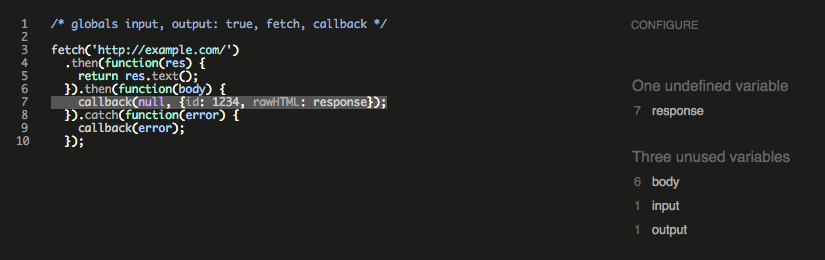
If your Code step produces an error you cannot identify, use a linter to find issues in your code. Tools like JSHint and ESLint can help. Paste your code directly into these tools.
If your code has an error about response not being defined:
fetch('http://example.com/').then(function(res) {
    return res.text();
  }).then(function(body) {
    callback(null, {id: 1234, rawHTML: response});
  }).catch(function(error) {
    callback(error);
  });
In JSHint, paste the code with the extra globals definition so the linter knows about Zapier's provided variables:
/* globals inputData, output: true, fetch, callback */

fetch('http://example.com/').then(function(res) {
    return res.text();
  }).then(function(body) {
    callback(null, {id: 1234, rawHTML: response});
  }).catch(function(error) {
    callback(error);
  });
The linter results show that response is incorrect. The correct variable is body:
 Note
NoteYou can safely ignore any warnings about "unused variables" for inputData, output, fetch, or callback. Zapier provides those for your convenience. However, if you notice other variables listed, it might indicate a bug in your code.
Still need help?
If this article did not fix the issue:
- Ask in the Zapier Community. Get advice from experienced Zapier users.
- Learn more about getting help and support with Zapier.