AI by Zapier uses a model tier system to determine task usage. The model tier selected and tool usage affect how many tasks your AI by Zapier step uses per run.
Available on plans:

Free

Professional
Team
Enterprise
Model tiers
| Model tier | Task multiplier | Tool support | Notes |
|---|---|---|---|
| Standard | 1x | No | Suitable for simple prompts without tools. |
| Advanced | 3x | Yes | Good balance of performance and cost for tool workflows. |
| Premium | 5x | Yes | The default for new steps. Best performance for complex tool workflows. |
| Your own AI account (Bring Your Own Key) | 1x | With Advanced or Premium models only | Use your own API credentials. The most cost-effective option for tool-heavy workflows. |
 Note
Note- When you create a new AI by Zapier step on a paid plan, the model tier defaults to Premium.
- If you select Auto within a tier, Zapier uses the default model for that tier: Claude 4.5 Haiku for Advanced, and Claude 4.6 Sonnet for Premium.
- If you're on a Free plan, you can add AI by Zapier to an unpublished Zap to preview the results. In preview, the model tier defaults to Standard, and the Advanced and Premium tiers are not available. Click Upgrade plan to unlock these tiers and publish your Zap.
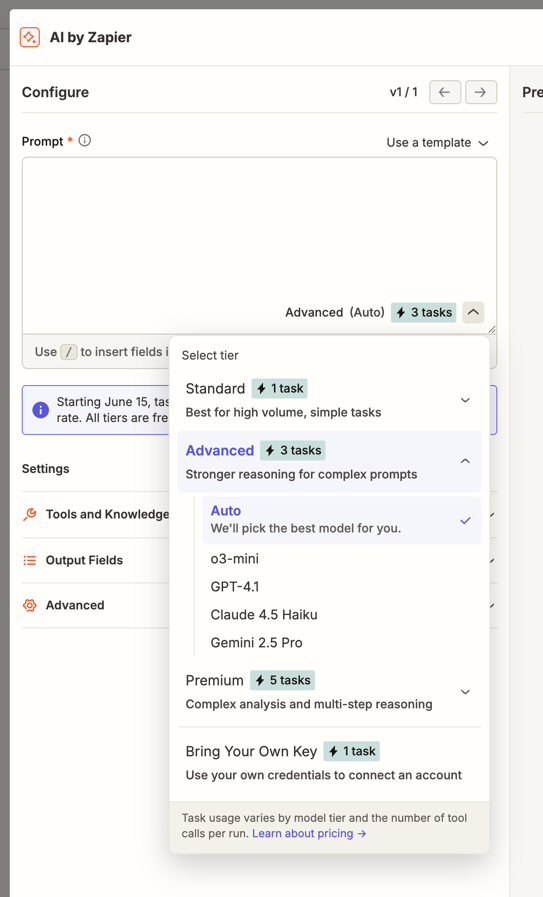
Available models by tier
| Model | Provider |
|---|---|
| GPT-4.1 nano | OpenAI |
| GPT-4.1 mini | OpenAI |
| GPT-4o Mini | OpenAI |
| GPT-5 nano | OpenAI |
| GPT-5 mini | OpenAI |
| GPT-5.4 Mini | OpenAI |
| GPT-5.4 Nano | OpenAI |
| Gemini 2.5 Flash | |
| Gemini 2.5 Flash Lite |
| Model | Provider |
|---|---|
| GPT-4.1 | OpenAI |
| o3-mini | OpenAI |
| Claude 4.5 Haiku | Anthropic |
| Gemini 2.5 Pro |
| Model | Provider |
|---|---|
| GPT-4o | OpenAI |
| GPT-5 | OpenAI |
| GPT-5.2 | OpenAI |
| GPT-5.4 | OpenAI |
| Claude 4.5 Sonnet | Anthropic |
| Claude 4.6 Sonnet | Anthropic |
| Claude 4.5 Opus | Anthropic |
| Claude 4.6 Opus | Anthropic |
| Claude 4.7 Opus | Anthropic |
| Claude 4.8 Opus | Anthropic |
Task calculation formula
A tool call is any time AI by Zapier successfully uses a tool (an app action or knowledge source) during a run. Learn how to add tools to your AI by Zapier step.
This is the formula used to calculate task usage on AI by Zapier steps:
Tasks used per run = (1 × model rate) + (number of tool calls × model rate)
Where: - Model rate is the task multiplier for your selected model tier (1x, 3x, or 5x). - Tool calls are app actions and knowledge sources used during the run.
Task usage examples
New AI by Zapier steps default to the Premium (5x) tier, so expect higher task usage unless you choose a lower tier.
The calculation column shows how tasks are computed using the formula:
(1 × model rate) + (tool calls × model rate) = total tasks
- The first part
(1 × model rate)is the task count for running the step itself. - The second part
(tool calls × model rate)is the task count used for each tool the AI calls (if any).
| Example | Model tier | Tool calls | Calculation | Total tasks |
|---|---|---|---|---|
| AI step with no tools | Standard (1x) | 0 | (1 × 1) + (0 × 1) | 1 task |
| Advanced (3x) | 0 | (1 × 3) + (0 × 3) | 3 tasks | |
| Premium (5x) | 0 | (1 × 5) + (0 × 5) | 5 tasks | |
| AI Step with tools (Premium) | Premium (5x) | 2 | (1 × 5) + (2 × 5) = 5 + 10 | 15 tasks |
| AI Step with tools (Advanced) | Advanced (3x) | 1 | (1 × 3) + (1 × 3) = 3 + 3 | 6 tasks |
| Your own AI account | Your own AI account (1x) | 4 | (1 × 1) + (4 × 1) = 1 + 4 | 5 tasks |
| Legacy step, no tools | Not available | 0 | — | 1 task |
Legacy AI by Zapier steps
Legacy AI by Zapier steps (created before June 15, 2026) will not be updated automatically and cannot use tools or knowledge sources. To use tools or select a model tier, you must create a new AI by Zapier step.
Legacy steps do not display model tiers, but the same tier logic applies. As of June 30, 2026, legacy steps that use knowledge sources with a Standard model are paused, whether they use your own key or Zapier's connection. Legacy steps that use an Advanced or Premium model will continue to run. To keep using knowledge sources, create a new AI by Zapier step and select an Advanced or Premium model.
Task limit per run
The task limit determines the maximum number of tasks an AI by Zapier step can use during a single run. The default is 75 tasks, and you can raise it up to 500 tasks to match workflows that query more resources. If a step reaches its task limit during a live run, Zapier will pause the step and ask you to approve it before continuing. This helps prevent unexpected task usage.
You can review and approve paused runs in your Zap history.
Next steps
You now know how model tiers affect task usage in AI by Zapier. Here are some useful next steps.