Zapier MCP runs on your existing Zapier plan. There is no separate MCP billing: every tool call through your MCP server consumes tasks from the same task allowance you use for Zap workflows and other Zapier products. This article explains how those tasks are counted, where to find your usage, and what happens when you reach your plan's task limit.
How tasks are counted
Each successful tool call through your MCP server consumes two tasks. This is a fixed rate.
- Tool calls that fail do not consume tasks.
- There is no limit on the number of tool calls per session.
- Tasks used through MCP count toward your plan's total task allowance.
For example, if you ask your AI client to find a contact in HubSpot and then send them an email through Gmail, that is two successful tool calls, four tasks in total.
Learn more about how task usage is measured in Zapier.
Where to find your usage
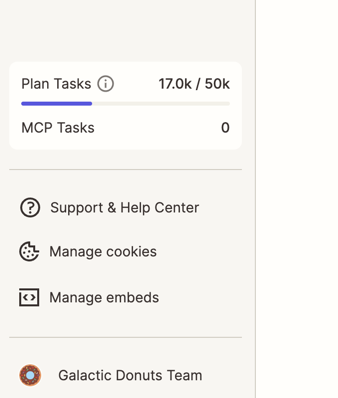
Your current task usage is displayed in the left sidebar of the Zapier MCP dashboard:
- Plan Tasks shows the total tasks used across your Zapier account this billing period, out of your plan's allowance.
- MCP Tasks shows how many of those tasks were used through Zapier MCP specifically.
Server and tool limits
Each AI client requires its own MCP server. You can have multiple servers (for example, one for Cursor, one for Claude, one for ChatGPT), but only one server per named client. Each server can have multiple tools added to it. A tool corresponds to a single action in a connected app, such as Create Google Calendar Event.
There is no limit on the number of tools you can add to a server, or the number of tool calls you can make per session. The only usage limit is the task allowance included with your Zapier plan.
What happens when you reach your plan's task limit
If you reach your plan's task limit, MCP tool calls stop working until your task allowance resets at the start of your next billing period, or you upgrade your plan. Your server configuration and connected apps stay in place. You do not need to reconfigure anything once tasks are available again.
To increase your task limit, upgrade your Zapier plan.
If your tools are failing and you still have tasks remaining, the issue is unrelated to your task limit.
Usage from deleted servers
When you delete an MCP server, all server logs are also deleted. Tasks already consumed by that server still count toward your usage for the billing period.