This article describes best practices when using in-line formulas in Zaps.
Combine static and dynamic values
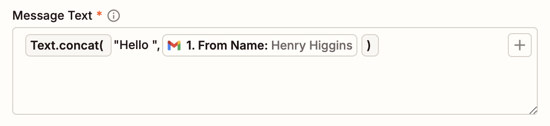
If you need to use both static and dynamic values inside a formula, use the Text.concat formula to combine them first.
If you want to combine a static value of “Hello” with a name value from a mapped field, you can use the Text.concat formula with one value being the static value and another being the dynamic value.
Nest formulas
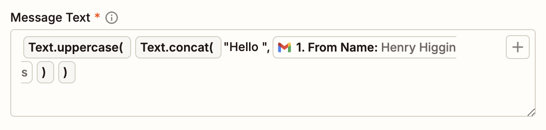
When nesting one formula inside of another, build from the outside in: add the final formula first, then add the next formula inside of it.
If you want to both concatenate and capitalize two values:
- Add the Text.uppercase formula.
- Replace its placeholder value with the Text.concat formula.
- Replace the values in the Text.concat formula.
Swap formulas
To swap one formula for another:
- Click the field’s input box right after the formula.
- Press delete (Apple) or backspace (PC) on your keyboard to remove the formula. This will not delete the values inside the formula.
- Add a new formula.
- Copy the values that were in the previous formula.
- Paste the copied values inside of the new formula to replace the placeholder text.
Wrapping values in quotation marks
For certain data types, you must wrap values in quotation marks for the formula to interpret it correctly, especially when they contain special characters like spaces and commas. Other data types should not have values wrapped in quotation marks.
| Data type | Wrapping | Example | Notes |
|---|---|---|---|
| Text | Wrap in quotation marks. | "Hello world!" |
|
| Numbers | Do not wrap in quotation marks. | 123 |
|
| Booleans | Do not wrap in quotation marks. | True |
|
| Lists | Wrap in quotation marks. | "[1,2,3]” |
|
| Object | Wrap in quotation marks. | '{"first_name": "Jane","last_name": "Doe"}' |
|
Testing in-line formulas
When you test a step that contains an in-line formula, the Data in tab will display the entire formula, not the transformed data. You can review the output in the live test result in your app instead.
Additional resources
Learn more about available in-line formulas.