Zapier Lead Router lets you automatically route incoming leads to your sales team based on rules you set, ensuring even and accurate distribution. This article explains how to set up Lead Router.
What's a router?
A router is a group of sales representatives connected to a set of rules that determine who receives the lead. Leads are submitted automatically to your router through a Zap. The router will evaluate the lead against its rules to decide which sales rep should receive it. You can create routers using the quickstart onboarder or manually.
Use Quickstart
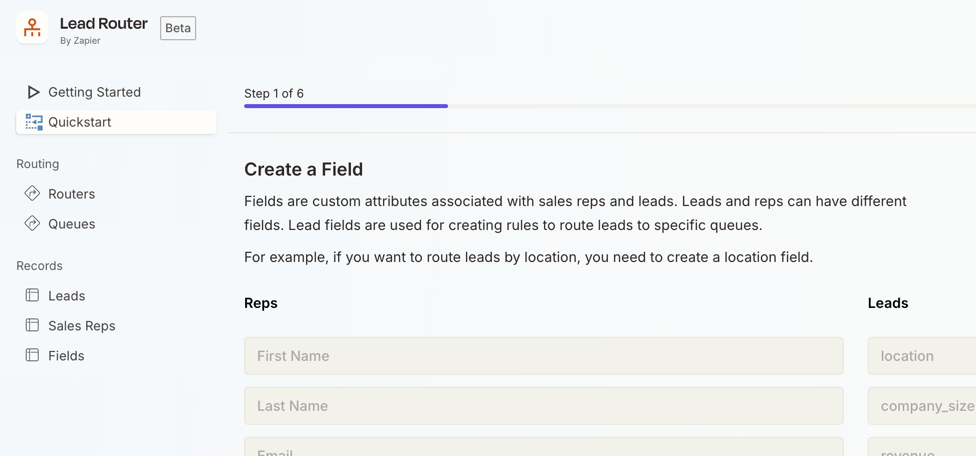
The fastest way to set up your first router is through the Quickstart option on the Lead Router home sidebar. It guides you through adding fields, sales reps, queues, and rules, explaining what each does throughout the process.
Create manually
To create routers manually, you must create:
- Fields: information about a lead that will be used to determine where to route it.
- Sales reps: the reps in your business who will work on leads.
- Queues: sets of reps based on common attributes that will be used to distribute incoming leads.
Once you have these resources in place, you'll use them to set up a router.
Add fields
You can create fields for both your leads and your sales reps.
- Lead fields are associated with a given lead, such as the company size or location, and are used to create rules that the router should check before assigning a lead to a set of representatives (a queue).
- Sales rep fields associate information with a specific sales rep profile, such as name, email, or their CRM ID.
To add a new field:
- From the Lead Router home, click Fields.
- Click + New record. A dialog box will open.
- Enter a name in the Field Name text field.
-
Select an option in the Entity Type dropdown menu:
- Lead
- Sales Rep
- Click Create.
All fields you create will appear on the Zapier Lead Router app action step and can be mapped with data from an app trigger.
Add sales reps
A sales rep is a member of your sales team who is eligible to receive leads. You can add reps to one or more queues.
To add a new sales rep:
- From the Lead Router home, click Sales reps.
- Click + New record. A dialog box will open.
- Enter the rep information in the available fields.
- Click Create.
Create a new queue
A queue is a group of sales reps who can be assigned the same types of leads. You can add unlimited queues, and each queue can be used in multiple routers, with different rules. To add a new queue:
- From the Lead Router home, click Queues.
- Click + Queue. A dialog box will open.
- In the Name field, enter a name for the queue.
- (Optional) Use the Description field to explain the logic or usage of the queue.
- Click Create.
- Click the name of your new queue.
- Click Edit to add reps to it. A dialog box will open.
- Select the reps you want to add to this queue.
- Click Save changes.
Use a weighted round robin
By default, queues use a strict round robin distribution. To use a weighted round robin, change the values for each rep in the Weight column according to their priority on that queue. Learn more about distribution types in Lead Router.
 Note
NoteThe Weight column accepts any positive integer (any whole number greater than zero).
Create a new router
A router is a collection of queues and rules that determine which sales rep will receive a lead. Each router must have at least one queue. Rules applied to a queue within a router will not affect the same queue when used in other routers.
To add a new router:
- From the Lead Router home, click Routers.
- Click + Router. A dialog box will open.
- In the Name field, enter a name for the router.
- In the Fallback sales rep field, search for and select an existing sales rep who will receive all leads that do not match this router's rules.
- Click Create. You'll be redirected to the router's main page, and you can now add queues and rules to the router.
Add queues to your router
Once you create a new router, you need to define which steps it'll follow to select the sales reps who will receive a lead. Each step consists of a queue and associated rules. To add a queue:
- From the Lead Router home, click Routers.
- Click the name of your router.
- Click + Step to add a new step to your router. A new dialog box will open.
- In the Queue dropdown menu, select an existing queue.
-
Click Save changes. The queue will be added as a step in your router.
- Queues will be evaluated in the order you add them.
Add rules to a queue
Rules you create only apply to that specific router. These rules function similarly to the rules in Filters and Paths. You can reuse the same queue in multiple routers to define different rules. To add rules to a queue:
- From the Lead Router home, click Routers.
- Select your router.
- Select the queue you want to create rules for.
-
In the Rules section, click each field to define a rule:
- Field: select the name of the field to check.
- Condition: select how the value will be matched.
- Value: the value that Lead Router should use when checking a lead.
-
(Optional) Add more rules:
- Click + AND if your lead must satisfy all of your rules before it matches.
- Click + OR if your lead must satisfy at least one of your rules before it matches.
- In the Distribution section, click the Queue dropdown menu to select which queue this rule applies to.
- Click Save changes.
How billing works in Lead Router
Lead Router charges your Zapier account for each lead that is successfully routed. As of June 1, 2026, all leads routed using the Route Lead step will consume 5 tasks per lead. Any other action steps in the Zap will count as one or zero tasks when run successfully, depending on the app you use. Learn more about how task usage is measured in Zapier.
Next steps
- Once you've set up your router, you must create a Zap to send leads to your Lead Router.
- Learn how to manage your routers in Lead Router.
- Automate sales rep and queue management with Zap actions.
- Set sales rep capacity to control how many leads a rep receives.