Zapier Tables allow you to give public viewing access, or editing access to specific tables, depending on your plan.
Share a public link to your table
A public sharing link for a table gives view-only access to anyone who has the URL.
To share a table:
- In the toolbar, click the Share icon . A dialog box will appear.
- Click Create a shareable link.
- Click the copy icon to copy it to the clipboard.
- Click the X at the top of the dialog box to close it and return to your table.
 . A dialog box will appear.
 to copy it to the clipboard.
 Note
NotePublic sharing links display a "Free" label at the top of the table, even if you're logged into a paid Tables account.
Share a table with other Zapier account users
Available on plans:

Free
Professional

Team
Enterprise
If you're part of a Team or Enterprise Zapier account, you can give other users in your account access to your table and provide different access levels, if necessary.
Give the same level of access to all users
- In the toolbar, click the Share icon . A dialog box will appear.
- From the Organization access section, click the dropdown menu and select a permission level.
The Zapier account Owner (in Enterprise and Team accounts) and all Super Admins (in Enterprise accounts) have access to all tables in the account and the same permissions as the table owner.
Give editing access to specific users or teams
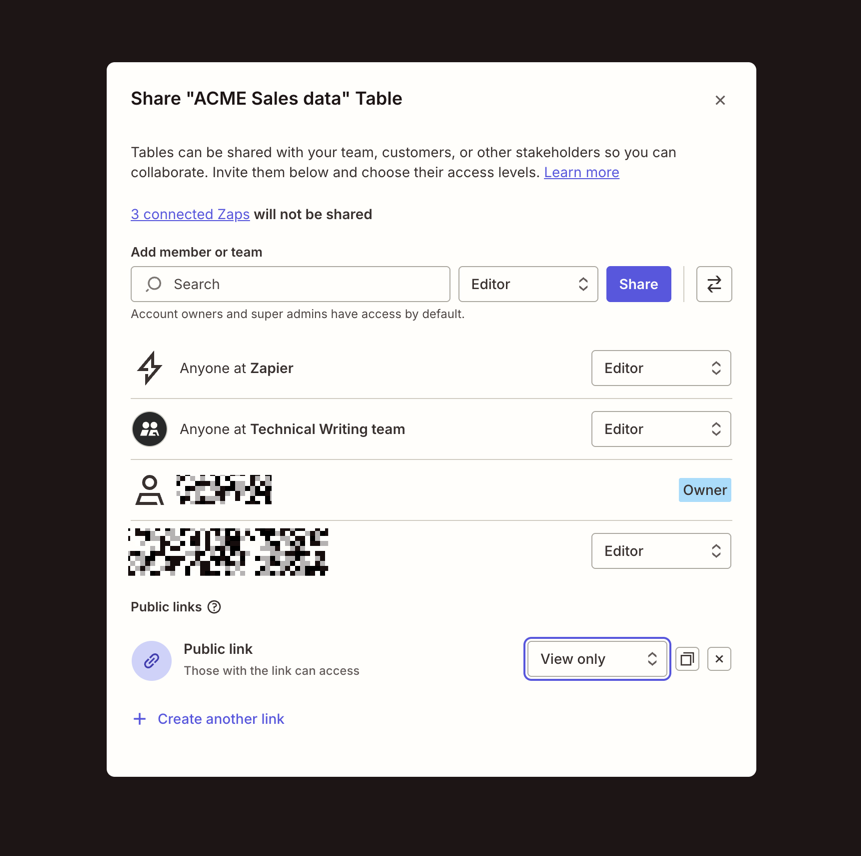
To give a Zapier user or team access to a table:
- In the toolbar, click Share. A dialog box will appear.
- In the Add member or team search box, enter the user's email, name, or team name.
- Select a permission level from the dropdown menu beside the search box.
- Click Share.
The user or team will appear in the list below with their assigned role. To change a user's permission level, click the dropdown menu beside their name and select a different role.
Roles and permissions
A Zapier Tables user can have one of the following roles:
| Role name | Permissions |
|---|---|
| Owner | The user who created the table. Edit fields, settings, records, and create Zap workflows. |
| Editor | Edit fields, settings, records, and create Zap workflows. |
| View only | View and export records. |
Limitations
- Table views can only be shared as View only.
- Sharing a table with another user does not give access to Zap workflows that use that table. On Team or Enterprise plans you can share the Zap folder with that user to give them access.
- If you're not part of a Team or Enterprise plan, tables can only be shared as "View only". To give editing access to non-Zapier users, share your table through a form project.
Data retention
Zapier's Data Retention, deletion, and export practices vary depending on the product. Learn more about the specific guidelines for the product you're using.