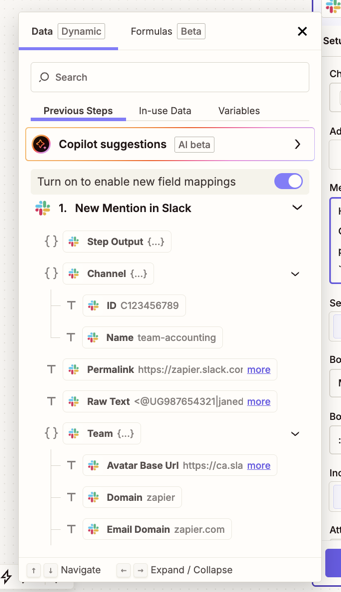
Field mapping in the Zap editor now shows structured data the way it actually exists—as nested objects, arrays, and lists—instead of flattening everything into long, repetitive field names. This makes it easier to find and map the exact data you need when working with complex API responses, webhook payloads, and AI outputs.
What does this mean for you?
- See the structure: A visual data browser shows hierarchical data as collapsible trees instead of flattened lists.
- Easily identify field types: Each field displays its data type (string, number, array, object) so you can map with confidence.
- Get line items easily: Hover on any nested field and click Get all values to map it as line items—no separate Formatter step needed.
- Map what you need: Select a single value, an entire array, or a whole object depending on what your next step requires.
Availability
Enhanced field mapping is available on all Zapier plans. During rollout, a toggle in the field mapping dropdown lets you switch between the nested view and the classic view.
Get started
Learn how to use the nested field mapping view.
Note
 Note
NoteThis information was accurate at the time of publication. Check the latest product update notes for any updates or changes.