When you delete records or fields in Zapier Tables, they're moved to Trash instead of being permanently removed. Trash gives you 30 days to restore deleted items before they're permanently deleted.
Delete records or fields
When you delete records or fields from a table, they're automatically sent to Trash.
Delete records
-
Select the checkbox next to the records you want to delete.
- To select all visible records, select the checkbox at the header of the table.
- In the toolbar at the bottom of the table, click the Delete icon.
Delete fields
- Click the field header of the field you want to delete.
- Click Delete field.
Access Trash
- In the toolbar, click the Trash icon .
- Click the Records or Fields tab to switch between deleted records and deleted fields.
- Use the Search box to find a specific item.
 .
.To view a deleted record's original field values, click the record name in Trash. From the detail panel, you can also click Restore this record to restore it directly.
 Restore this record to restore it directly.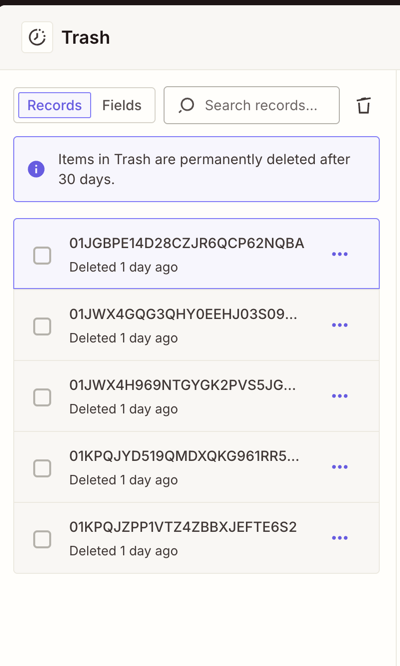
Restore items from Trash
- In the toolbar, click the Trash icon .
- Click the Records or Fields tab to find the item you want to restore.
- Click the menu icon beside the item.
- Click Restore record or Restore field depending on what you want to recover. The item will be added back to your table.
 beside the item.
To restore multiple items at once, select the checkbox beside each item, then click Restore.
Permanently delete items from Trash
Items in Trash are automatically and permanently deleted after 30 days. You can also permanently delete items at any time.
Delete individual items
- In the toolbar, click the Trash icon .
- Click the menu icon beside the item you want to permanently delete.
- Click Delete forever.
Empty all items from Trash
To permanently delete all items in Trash at once:
- In the toolbar, click the Trash icon .
- Click the Empty trash icon in the Trash panel toolbar.
- In the confirmation dialog, click Empty trash.
 Note
NotePermanently deleting items from Trash cannot be undone.
Limitations
- Items in Trash are permanently deleted after 30 days.
- Restoring a record will place it back in the table, but it may not return to its original position.