The audit log is a record of the events that happen in your Zapier account, such as a member creating a Zap, changing an app connection, or updating a group. Each entry shows who performed the event, what they did, and when. You can review these entries in the Admin Center and filter them to find what you need.
To send these events to your own endpoint as they happen, use log streams (Enterprise only). To learn how the two features differ, go to Understanding the audit log and log streams.
Available on plans:

Free
Professional

Team
Enterprise
Before you begin
- In Team accounts, you must be the owner of your account.
- In Enterprise accounts, you must be a super admin or owner.
View account activity
To open the Audit log page:
- Click Admin Center in the main left sidebar. You will be redirected to a new page.
- In the Insights section of the Admin Center sidebar, click Audit log. You will be redirected to that page.
The page contains a table of log entries. Each log entry includes the following information:
- Event type: a summary of the account activity that was performed.
- Object (optional): if the event involved a specific asset, like a Zap or MCP server, a record of which asset was used.
- Performed by: the actor who performed the event. When Zapier performs the event, the performer is “Zapier System”.
- Date: the timestamp when the event occurred.
- IP address (optional): the IP address the event came from. Not all events will include an IP address.
Review event details
Click an event to open a side panel with its details. The side panel includes one or more of the following data, depending on the event:
- Affected object: the asset the event applies to.
- What changed: the value that changed, for events that change a value.
- Performed by: the member's name, email, and role.
- Date: when the event occurred.
- IP address: the IP address the event came from. This field is blank for some events.
- Event data: the full event in JSON format. This is the same data that log streams send to your endpoint.
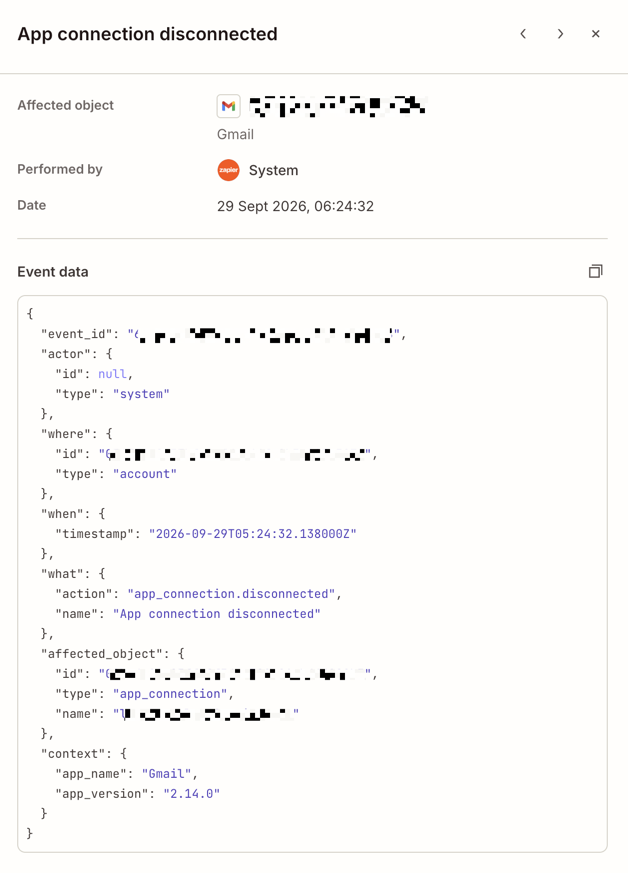
Audit log events use a shared schema that tracks who performed an event, where it occurred, what was affected, and when it happened.
    {
  "version": "1.1.0",
  "event_id": "3564c9da-b3a5-43d3-b671-ef19f5eccf03",
  "actor": {
    "id": "01009a9b-a5a4-85b4-b5a9-e94998489e2b",
    "type": "user",
    "email": "jane.doe@example.com",
    "first_name": "Jane",
    "last_name": "Doe"
  },
  "where": {
    "id": "03d62d5d-26e7-87b2-a4c6-967869a8be1a",
    "type": "account"
  },
  "when": {
    "timestamp": "2025-08-26T09:52:50.625Z",
    "timestamp_ms": 1756201970625
  },
  "what": {
    "action": "zap.created",
    "name": "Zap created"
  },
  "affected_object": {
    "id": "00000000-0000-c000-8000-000293850453",
    "type": "zap",
    "name": "(Copy) mindesign webinar - 5 min before"
  },
  "context": {
    "app_name": "Zoom",
    "app_version": "2.25.0"
  }
}
Change events
When an ownership change event occurs (such as zap.owner_changed, app_connection.owner_changed, or variable.owner_changed), the payload includes an additional what_changed object that describes the transition:
    {
  "version": "1.1.0",
  "actor": {
    "id": "014ed0bb-cd81-82bc-a951-a00906b04e70",
    "type": "user",
    "email": "jane.doe@example.com",
    "first_name": "Jane",
    "last_name": "Doe"
  },
  "where": {
    "id": "0331f89b-ac40-8bdf-8ed8-af90110062d1",
    "type": "account"
  },
  "what": {
    "action": "zap.owner_changed",
    "name": "Zap owner changed"
  },
  "affected_object": {
    "id": "00000000-0000-c000-8000-000366644697",
    "type": "zap",
    "name": "Marketing AI Agent #1 — Customer feedback triage"
  },
  "what_changed": {
    "change_type": "previous_value new_value",
    "object": {
      "previous_value": {
        "id": "014ed0bb-cd81-82bc-a951-a00906b04e70",
        "type": "user"
      },
      "new_value": {
        "id": "015a0266-b8e0-89f6-b1ca-f20efd684448",
        "type": "user"
      }
    },
    "scalar": null
  },
  "context": {
    "ip_address": "203.0.113.7"
  },
  "when": {
    "timestamp": "2026-06-01T16:03:58.069Z",
    "timestamp_ms": 1780329838069
  }
}
| Field | Type | Description |
|---|---|---|
what_changed |
object | Describes what changed. Present for change events like ownership transfers. |
what_changed.change_type |
string | Type of change: object (structured data with id and type) or scalar (simple value). |
what_changed.object |
object or null | Contains previous_value and new_value when change_type is object. |
what_changed.object.previous_value |
object | The value before the change, containing id and type. |
what_changed.object.new_value |
object | The value after the change, containing id and type. |
what_changed.scalar |
object or null | Contains previous_value and new_value when change_type is scalar. |
context.ip_address |
string | IP address of the actor who performed the action. |
Payload fields
The following table describes each field in the audit log event payload.
| Field | Type | Description |
|---|---|---|
version |
string | Schema version (current: 1.1.0). |
event_id |
string | Unique identifier for the event. |
actor |
object | Who performed the action. |
actor.id |
string or null | Unique identifier for the actor. null when actor.type is system. |
actor.type |
string | Type of actor: user or system. |
actor.email |
string or null | Email address of the actor. null when actor.type is system. |
actor.first_name |
string or null | First name of the actor. null when actor.type is system. |
actor.last_name |
string or null | Last name of the actor. null when actor.type is system. |
where |
object | Where the action occurred. |
where.id |
string | Account identifier. |
where.type |
string | Type of location (for example, account). |
when |
object | When the action occurred. |
when.timestamp |
string | ISO 8601 timestamp. |
when.timestamp_ms |
number | Unix timestamp in milliseconds. |
what |
object | What action was taken. |
what.action |
string | Event key (for example, zap.created). |
what.name |
string | Human-readable event name. |
affected_object |
object | The object affected by the action. |
affected_object.id |
string | Unique identifier for the affected object. |
affected_object.type |
string | Object type (for example, zap, app_connection, variable). |
affected_object.name |
string | Name of the affected object. |
context |
object | Additional context. Varies by event type. |
Filter events
Filter the audit log to narrow the list to the events you need. For example, you can review everything that happened to one Zap, or everything one member did. By default, the audit log displays the last 30 days of events.
You can filter by event type, object, the member or system that performed the event, date, and details in the event data. To review the events that you can filter by, go to the event types section.
You can filter from the input box at the top of the page:
- Click either the Filter audit log events input box or the Filters button. A dropdown menu will open below the input box.
- Select a filter category. The dropdown menu will reload new options specific to the filter category you selected.
- Select the checkbox next to each filter.
 Filters button. A dropdown menu will open below the input box.
To change the date filter:
- Click the Date button. A dropdown menu will open.
- Use the calendars in the dropdown menu to select a new date range.
- Click Done.
 Date button. A dropdown menu will open.
To change the time range, click the Date filter.
You can also filter from the sidebar of a specific log:
- On the audit log page, select a log. The right sidebar will open.
- In the Event data section, hover over an event in the JSON. A filter icon will appear next to the event.
- Click the filter icon. The page will reload and the sidebar will close.
The input box at the top of the page will load the filter you selected in the sidebar and the logs will be filtered accordingly.
Event types
The audit log records the events in the following tables. Each event has an event name and an event key. The event name is the readable name shown in Zapier, such as Zap created. The event key is a short code for the same event, such as zap.created. Zapier includes the event key in the event data, so your endpoint can tell which event it received. Log streams send these same events to your own endpoint. Log streams also support Zap execution events, which are not in the audit log.
Select a category to review its events.
| Event | Description |
|---|---|
app_connection.created |
A user connected their app account to Zapier. |
app_connection.deleted |
A user deleted their app connection. |
app_connection.disconnected |
A connection expired and requires reconnection. |
app_connection.owner_changed |
A user transferred ownership of their app connection. |
app_connection.reconnected |
A user reconnected their app account to Zapier. |
app_connection.shared |
A user shared an app connection with other users. |
app_connection.unshared |
A user stopped sharing an app connection. |
| Event | Description |
|---|---|
variable.created |
A user created a new variable. |
variable.deleted |
A user deleted an existing variable. |
variable.owner_changed |
The owner changed for an existing variable. |
variable.updated |
A user edited an existing variable. |
| Event | Description |
|---|---|
mcp_server.created |
A user created a new MCP server. |
mcp_server.deleted |
A user deleted an MCP server. |
mcp_server.shared |
A user shared an MCP server with another user or account. |
mcp_server.sharing_role_updated |
A user changed sharing role permissions for a given user. |
mcp_server.tool_added |
A tool was added to an MCP server. |
mcp_server.tool_removed |
A tool was removed from an MCP server. |
mcp_server.tool_share_link_created |
A user created a new share link for their MCP server tool bundle. |
mcp_server.tool_share_link_deleted |
A user deleted a share link for their MCP server tool bundle. |
mcp_server.tool_updated |
A tool was updated on an MCP server. |
mcp_server.unshared |
A user unshared an MCP server with a user or account. |
mcp_server.updated |
A user updated an MCP server. |
| Event | Description |
|---|---|
table.created |
A user created a new table. |
table.deleted |
A user deleted their table. |
table.import_completed |
A table import finished. |
table.import_started |
A user began importing data into a table. |
table.shared |
A user shared a table with another user or account. |
table.sharing_role_updated |
A user changed sharing role permissions for a given user. |
table.unshared |
A user unshared a table with a user or account. |
| Event | Description |
|---|---|
account.app_connection_allowed_domains_created |
Allowed domains were configured for app connections. |
account.app_connection_allowed_domains_deleted |
Allowed domains were removed for app connections. |
account.app_connection_allowed_domains_updated |
Allowed domains were updated for app connections. |
account.app_connection_denied |
An app connection was denied due to domain restrictions. |
account.member_added_to_account |
A new user was added to the account. |
account.member_invitation_accepted |
Someone accepted their member invitation and is now an active user of the account. |
account.member_invitation_sent |
An admin sent an invitation for a user to join the organization. |
account.member_logged_in |
A user in the account logged onto Zapier. |
account.member_permissions_updated |
A user's member permissions were changed. |
account.member_removed_from_account |
A user was removed from the account and no longer has access. |
account.group_created |
A user created a new group in the organization. |
account.group_updated |
A user updated a group, such as changing its name. |
account.group_deleted |
A user deleted a group from the organization. |
account.group_member_added |
A user was added to a group. |
account.group_member_removed |
A user was removed from a group. |
account.ip_allowlist_configuration_updated |
An admin changed the account's IP allowlist enforcement mode. |
account.ip_allowlist_entry_created |
A trusted IP address or CIDR range was created in the account's IP allowlist. |
account.ip_allowlist_entry_updated |
An existing entry in the account's IP allowlist was modified, such as its address, label, or access scope. |
account.ip_allowlist_entry_deleted |
A trusted IP address or CIDR range was deleted from the account's IP allowlist. |
| Event | Description |
|---|---|
api_credential.created |
A user created a new API credential. |
api_credential.revoked |
A user revoked an API credential. |
api_credential.secret_rotated |
A user rotated the secret for an API credential. |
api_credential.updated |
A user updated an API credential. |
| Event | Description |
|---|---|
folder.asset_moved |
An asset was moved into or out of a folder. |
folder.copied_to_account |
A folder was copied to another account. |
folder.created |
A user created a new folder. |
folder.deleted |
A user deleted a folder. |
folder.moved |
A user moved a folder. |
folder.renamed |
A user renamed a folder. |
folder.shared |
A user shared a folder. |
folder.unshared |
A user unshared a folder. |
| Event | Description |
|---|---|
zap.approval_request_approved |
A super admin or owner approved a change request. |
zap.approval_request_cancelled |
A user cancelled their change request. |
zap.approval_request_denied |
A super admin or owner denied a change request. |
zap.approval_request_sent |
A user submitted a change request for approval. |
zap.created |
A user created a new Zap. |
zap.moved_to_trash |
A user moved a Zap to the trash. |
zap.owner_changed |
A user transferred ownership of their Zap. |
zap.permanently_deleted |
A user permanently deleted a Zap. |
zap.restored_from_trash |
A user restored a Zap from the trash. |
zap.review_approved |
A reviewer approved a Human in the Loop approval request in a Zap. |
zap.review_data_collected |
A reviewer submitted a Human in the Loop data collection request in a Zap. |
zap.review_denied |
A reviewer denied a Human in the Loop approval request in a Zap. |
zap.turned_off |
A user turned off a Zap. |
zap.version_enabled |
A user turned on a version of their Zap. |
zap.version_published |
A user published a new version of their Zap. |
Limitations
- In Team accounts, you have access to the past 6 months of account activity.
- In Enterprise accounts, you have access to the past 12 months of account activity.
- The filter field looks up filter names, not events.
- Some lines in the side panel do not have a filter icon. For example, you can filter by a member's user ID, but not by their name.
- You cannot filter by timestamp. Use the date filter instead.
To learn how the audit log and log streams differ, go to Understanding the audit log and log streams.
Learn more about the Audit Log in the Zapier Community.