Secure Socket Layer (SSL) certificates enable encrypted communication between your browser and websites like https://zapier.com. They also verify you're viewing the intended webpage, helping to prevent attackers from spying on your data. When Zapier connects to third-party services (like Gmail, Salesforce, or Zendesk) through their APIs, the same SSL technology protects the data exchanged on your behalf.
SSL and Certificate Authorities (CAs)
SSL certificates require both parties to trust an independent third party called a Certificate Authority (CA). The CA signs each SSL certificate it issues. There are many CAs on the internet. Zapier keeps the list of supported CAs synced with Mozilla.org's CA list.
How Zapier uses SSL certificates
Zapier verifies SSL certificates on every API call to ensure secure data transfer. The services you connect typically manage their own certificates, so you don't need to configure anything.
Some services allow you to use your own domain (like Desk, Jira, SugarCRM, or Magento). When you do, your domain must have its own SSL certificate signed by a CA that Zapier trusts. If you purchase an SSL certificate from a CA that Zapier doesn't recognize, you may see a certificate verification error. This doesn't mean the CA is invalid—it may not be on the trusted list yet.
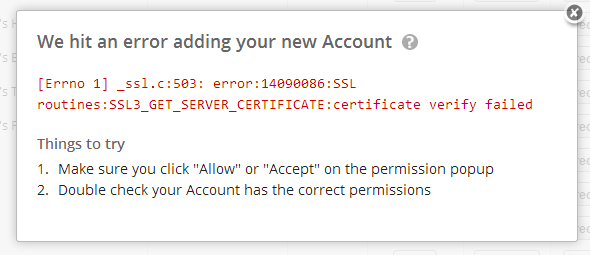
Disable SSL certificate checks
Only disable SSL checks as a last resort. Disabling checks may allow attackers to manipulate or eavesdrop on data sent to and from Zapier. When disabled, Zapier doesn't verify that the CA is trusted. You still
need a signed SSL certificate, but Zapier won't enforce its validity.
To disable SSL certificate checks:
- Go to the Security and data page in your Zapier account settings.
- In the Security section, select SSL certificate checks. You will be redirected to a new page.
- Select the Disable SSL Certificate Checks checkbox.
Limitations
If you're on a Team or Enterprise plan, disabling SSL certificate checks only applies to you. It will not apply to other users in your account.
Supported services
Zapier respects this "disable" option on a case by case basis for services. If disabling checks does not resolve the error, re-enable them and contact Zapier support for more help. Disabling SSL certificate checks only affects these services:
- Desk
- Jira
- QuickBooks
- Redmine
- RSS
- SugarCRM
- Webhooks
 Note
NoteAn "SSL" error doesn't necessarily imply a certificate problem. For example: "SSLERROR: The read operation timed out" is actually not a certificate problem. This error simply indicates the remote server didn't respond to our requests in a timely manner.